Rapid Employment Verification
What is the Rapid Employment Verification check?
In order to expedite the referencing collection process, employers have sometimes turned to workarounds such as accepting candidate-provided documentation for verification. This introduces more administration for candidates, alongside the risks of sharing personal data and even potential fraud due to the provision of inaccurate or misleading information.
To address these issues and strike a balance between speed, data security, and minimising data collection, employers can now instantly verify a candidate's employment history, including identifying any gaps in employment, through Access Screening with Konfir's technology embedded within our product. Employers have the flexibility within the software to select between instant employment verification checks and more comprehensive reference checks, depending on the risk level, legislation and role requirements.
- Comprehensive Reference from Employers – automate the process of sending reference requests to Employers
- Rapid Employment Verification of Employment – verify your candidates employment history digitally, depending on the risk level, legislation and role requirements.
- Combined verification – combine comprehensive employment references and rapid verification
Check Coverage
UK
Why Use Access Screening for the Check?
- Uses Konfir's techonology to provide rapid results
- This integrated functionality aggregates data from various consent-driven sources, including payroll, banking or HMRC data sources in a GDPR-compliant manner, offering an efficient solution to minimise turnaround time for every request.
- Check can be added to your existing workflows
- Allows you to run all your checks from one place in Access Screening
How it Works
Results
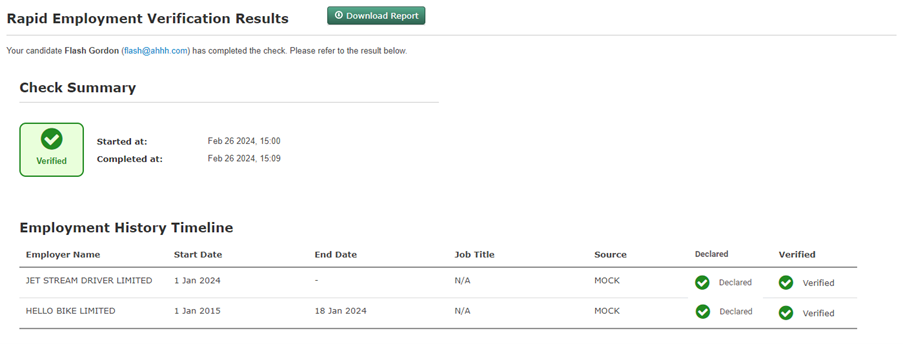
Verified - This means that all the employment and gaps that have been checked have been verified.
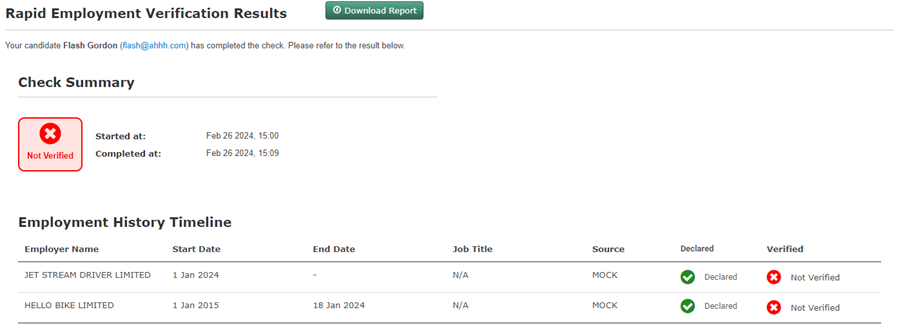
Not Verified - This means that all the employment and gaps that have been checked have not been verified.
Review - This means that all the employment and gaps that have been checked have been verified and not verified.
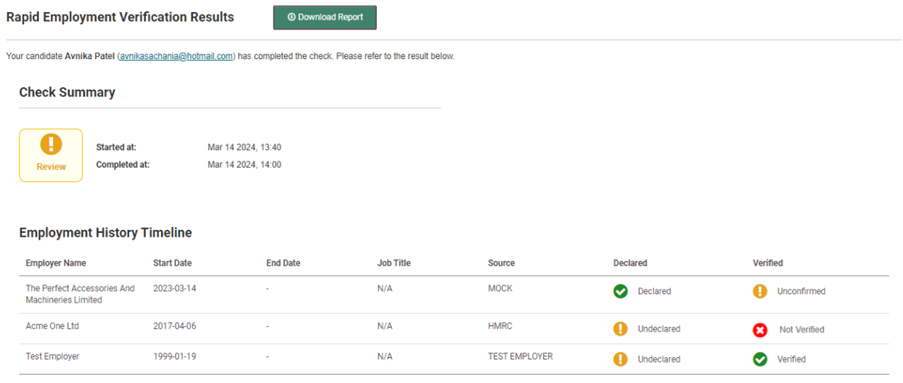
For all 3 of the above results, there are additional results for each reference:
In the Declared column, the status could be:
- Declared: This is a reference that the candidate provided
- Undeclared: This is a reference that the candidate did not provide
In the Verified column, the status could be:
- Verified: The employment or gap is verified with at least an Employer Name and Start Date
- Not verified: Candidate employment or gap has NOT been verified
- Unconfirmed: Candidate employment has NOT been verified, however some banking transaction data, or overlapping verified employment from HMRC, Payroll, or Open Banking has been returned. This data needs to be reviewed in the report.